
If you are an international student, expat, or frequent business traveler staying outside of mainland China, accessing domestic video, music, and financial services often triggers strict “regional restrictions” or copyright blocks. To bypass these limitations, you need to use a Reverse VPN or Reverse Proxy to route your network traffic back to China. This guide provides a comprehensive, hands-on review of the best tools to get a China IP, including KuaiFan, Malus, LinkCN, GoLink, and self-built servers in 2026.
What is a Reverse VPN & Reverse Proxy? Bypassing the Wall in Reverse
For most users looking to get a China IP, the go-to solutions are commercial “repatriation accelerators” found on the App Store. Technically, their architecture works in the exact opposite direction of outbound VPNs:
- Forward Proxy vs. Reverse Proxy: While outbound VPNs tunnel traffic out of China to bypass censors, a Reverse VPN or Reverse Proxy tunnels your connection into mainland China. It routes your data through highly encrypted offshore entry nodes directly into private Chinese backbone servers, allocating a legitimate mainland China IP address to your device.
- High-Bandwidth Transit Optimization: Due to the massive physical distance of cross-border routing (e.g., US-to-China round trips often exceed 150ms), premium Reverse VPN providers lease high-speed, dedicated IPLC/IEPL cross-border fiber lines. This completely circumvents public congestion, ensuring lag-free 4K video streaming and stable, low-ping gaming.
1. Top-Tier Commercial Back-to-China VPNs (Plug-and-Play)
For users who want to stream 4K movies or play games, commercial back-to-China accelerators (Reverse VPNs) are the easiest, most reliable choices. For a comprehensive comparison of standard outbound proxy networks, please check our flagship English guide: 2026 Best Working VPNs for China: Reliable & Security-Tested Guide →.
Malus (马鲁斯)

Best Use Cases
Malus is specifically tailored for overseas Chinese, expats, and students in Hong Kong, Macau, Taiwan, North America, Europe, and Australia to access mainland video, music, live streaming, domestic banking, and national server gaming. It does not provide services for users physically inside mainland China.
Platform & Functionality
Supported Platforms: Windows, macOS, iOS, Android, Android TV, and a dedicated Chrome/Edge browser extension.
Core Features: Offers unlimited bandwidth, intelligent node selection, manual switching, and multi-scenario optimization (Video, Audio, Gaming, and Live Streaming).
Membership & Concurrent Devices
Malus offers two tiers of service: Standard Membership (optimized for video and audio) and Premium/Game Membership (optimized for global game acceleration and live streaming). Standard supports up to 3 concurrent devices, while Premium supports up to 5 concurrent devices, with guaranteed peak bandwidth references (e.g., 30Mbps/50Mbps for streaming, 20Mbps for gaming).
Pricing & Refund Policy
App Store Pricing: Approximately $4.99/month, $18.99/90-days, and $54.99/360-days for the Standard tier. The Game tier is priced higher (e.g., $7.99/month or $89.99/year).
Refund Window: Offers a conditional 30-day money-back guarantee. It only applies to first-time purchases made directly on the official website. The refund window is tiered by plan length (30 days refund for plans ≥ 360 days; 14 days refund for plans ≥ 180 days; 7 days refund for plans ≥ 90 days; plans under 90 days or discounted over 20% are non-refundable).
Pros & Cons
- Pros: Full platform compatibility, high native IP ratio, dedicated gaming lines, unlimited bandwidth, up to 5 concurrent devices on Premium plan.
- Cons: Highly strict refund policy; slightly premium cost.
- Official Links & Detailed Reviews: Malus Official Site | Read our in-depth Malus Review
KuaiFan (快帆)
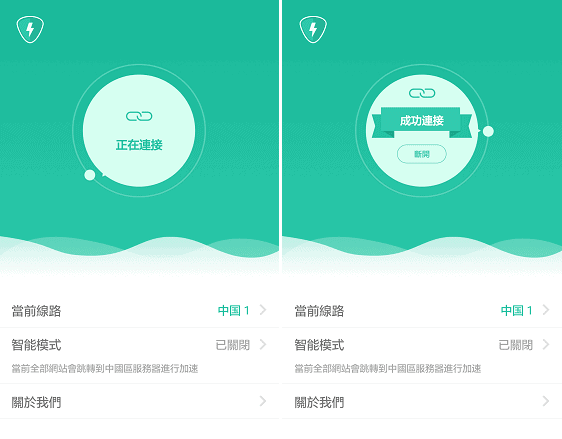
Best Use Cases
Designed to route your connection back to mainland China, instantly unlocking geo-restricted video, music, live streaming, social media, and office apps with app-based split tunneling. Standard and stable choice for families.
Platform & Functionality
Native clients are available for Android, iOS, Windows, macOS, and Android TV. Features over 150+ high-speed routes, TV-compatibility, and app-based split tunneling on Android devices.
Pricing & Refund Policy
Approximately ¥480 for 360 days, ¥125 for 90 days, and ¥45 for 30 days. Offers a 7-day money-back guarantee for website purchases, subject to a deductions fee based on used days plus a 6% processing fee.
Pros & Cons
- Pros: Extremely old-school, stable, TV compatibility, supports 3 concurrent devices, offers a mobile free tier (with ads).
- Cons: Peak hours on free lines might suffer from bandwidth limits.
- Official Links & Detailed Reviews: KuaiFan Official Site | Read our in-depth KuaiFan Review
QuickFox
Best Use Cases
Highly recommended for overseas Chinese, international students, and business travelers looking to unblock domestic audio/video platforms (such as Bilibili, Tencent Video, iQiyi, NetEase Cloud Music) and accelerate mainland servers for online games with outstanding connection stability.
Platform & Functionality
Provides native clients for Android, iOS, Windows, macOS, and Android TV. Features high-speed dedicated lines, TV compatibility, and application split tunneling on mobile devices to optimize bandwidth allocation.
Pricing & Refund Policy
Offers a permanently free streaming mode with occasional ads. VIP plans cost approximately ¥40 per month, with annual plans averaging around ¥20 to ¥30 per month. Features up to 5 concurrent devices and is backed by a 7-day refund guarantee.
Pros & Cons
- Pros: Genuinely free streaming tier, exceptional game acceleration on VIP routes, supports up to 5 concurrent devices, easy one-click connection.
- Cons: Mobile free tier displays occasional pop-up ads.
- Official Links & Detailed Reviews: QuickFox Official Site | Read our in-depth QuickFox Review
Transocks (穿梭)
Best Use Cases
Bypassing geographic restrictions for Bilibili, iQiyi, Youku, Tencent Video, QQ Music, and NetEase Cloud Music. Highly popular for occasional, budget-friendly everyday streaming.
Platform & Functionality
iOS, Android, Windows, macOS, Android TV, and Chrome/Edge extensions. Allows up to 3 concurrent devices and provides a physical router integration.
Pricing & Refund Policy
Extremely budget-friendly at ¥260 for 360 days, ¥135 for 180 days, and ¥70 for 90 days, with a standard 3-day trial refund.
Pros & Cons
- Pros: Exceptional value, double service model (mobile free tier with ads, fast VIP lines), simple one-click operations.
- Cons: No native gaming support on standard tier; ads on free versions.
- Official Links & Detailed Reviews: Transocks Official Site | Read our in-depth Transocks Review
LinkCN
Best Use Cases
Premium cross-border streaming and business connections. Highly regarded for offering stable, high-bandwidth 4K video outputs and lowering game latency for國服 gamers.
Platform & Functionality
iOS, Android, Windows, macOS, and Android TV. Offers intelligent split-channel routing to only tunnel mainland apps without affecting your local network.
Pricing & Refund Policy
Flexible packages supporting monthly, quarterly, and annual subscriptions with excellent buy-and-get-free promotions.
Pros & Cons
- Pros: Top-spec IEPL dedicated fibers, smooth 4K streaming, responsive split-tunneling division, beautiful interface.
- Cons: Premium pricing; only for returning to China.
- Official Links & Detailed Reviews: LinkCN Official Site | Read our in-depth LinkCN Review
GoLink
Best Use Cases
Esports-grade low-latency return acceleration for gamers, students, and digital nomads seeking low ping on Honor of Kings and League of Legends CN.
Platform & Functionality
Clean and extremely lightweight clients for iOS, Android, Windows, and macOS, supporting custom gaming-mode switches.
Pricing & Refund Policy
Highly affordable pricing structure with massive student discounts, easily fitting budget-conscious users.
Pros & Cons
- Pros: Exceptional low ping and minimal packet-loss, clean interface, lightweight on resources, great student discounts.
- Cons: Exclusively optimized for speed and gaming over heavy encryption.
- Official Links & Detailed Reviews: GoLink Official Site | Read our in-depth GoLink Review
WallMama Quick Decision: Which Back-to-China VPN Should You Choose?
If you are still overwhelmed by the choices, consult our 3-second rapid selection matrix to lock in your perfect service:
- 4K Ultra-HD Video, Smooth Streaming, Family Multi-Devices (Best All-Rounders): Choose LinkCN or KuaiFan (快帆). They offer massive bandwidth reserves and flawless 4K decoding with no buffer lag.
- Esports Gaming, Low Latency, Packet-Loss Resistance (Best for Gamers & Students): Choose GoLink or Malus. Their dedicated IEPL gaming tunnels ensure stable connections and minimal ping spikes on national servers.
- Occasional Music, Low Frequency, Zero Budget (Best Free Option): Choose Transocks (穿梭). Their mobile free tier contains mild ad SDKs but allows unlimited free streaming on NetEase and QQ Music.
- Bypassing Financial Controls, Shop Isolation, Static Dedicated IP (Best for Businesses): Deploy your own private mainland cloud server (Trojan), or buy high-reputation ISP proxy lines from MarsProxies.
2. Enterprise-Grade Commercial Proxies with China IP Pools
If you are managing e-commerce stores (Taobao, 1688), performing web scraping, social media verification, price monitoring, or high-security business operations, you need highly pure, rotating or sticky Residential, Mobile, or ISP proxy IPs with city-level or ASN targeting. Below are the best enterprise proxy networks that officially support mainland China nodes:
- MarsProxies —— High-Cost-Performance Chinese Residential IP & Non-Expiring Bandwidth: Features a massive, clean pool of mainland Chinese residential IPs. They offer flexible pay-as-you-go pricing, high bulk discounts, and traffic that never expires, meaning you only pay for actual bandwidth used. Check our guide: How to Get a Mainland China IP with MarsProxies →
- Bright Data —— Global Leader in Mainland Chinese Residential & ISP Proxies: The undisputed leader in proxy networks. Provides millions of clean Chinese residential, mobile, ISP, and datacenter IPs, supporting city-level targeting (such as Beijing and Shanghai), sticky sessions, and automated rotation. Check our guide: How to Get a China IP with Bright Data →
- Oxylabs —— High-Concurrency Enterprise Chinese Residential Proxy Specialists: Highly stable residential proxies with premium CN IP blocks, supporting unlimited concurrent sessions, exceptional scraping success rates, and robust city-level targeting. Check our guide: How to Get a China IP with Oxylabs →
- SOAX —— Precise City & ASN Targeted Dynamic Returning Proxies: Features robust and clean residential/mobile IP pools in mainland China, allowing precise filtering by province, city, and ASN. Check our guide: How to Get a China IP with SOAX →
Important Warning: Some international proxy brands (such as Smartproxy or Decodo) have policy-level restrictions that do not provide mainland Chinese nodes in their dashboards. Choose MarsProxies or Bright Data for guaranteed availability.
3. Self-Built Proxy: Renting a Mainland VPS & Deploying Trojan (High GFW Resilience)
For advanced users, developers, or businesses who require a fixed, exclusive, and 100% private mainland China IP address with maximum data control and low long-term running costs, renting a mainland cloud server is the ultimate solution.
Step 1: Choose a Cloud Provider & Obtain an Elastic IP (EIP)
You should purchase a VPS (such as ECS or CVM) in a mainland China region from top-tier Chinese cloud providers: Alibaba Cloud (阿里云), Tencent Cloud (腾讯云), or Huawei Cloud (华为云). Ensure that you bind an Elastic IP (EIP) situated in mainland China (which registers as a mainland geographic IP in global databases).
Account Verification Note: Purchasing and operating cloud resources physically located in mainland China strictly requires real-name identity verification (实名认证). However, if you are only running an outbound proxy for your private use rather than hosting a public-facing website, you do not need to undergo the complex ICP Filing (ICP 备案) process.
Step 2: Deploy GFW-Proof Proxy Protocols (Trojan Preferred)
In 2026, it is highly discouraged to install legacy Squid or SOCKS5 proxies on your mainland servers. Because they lack obfuscation layers, the GFW’s Deep Packet Inspection (DPI) firewalls can easily detect and block their connection ports, or even blacklist your mainland VPS IP, making your server useless within minutes.
The Ultimate Self-Built Solution: Deploy the highly secure, GFW-proof protocol Trojan. It operates by masking your proxy data as standard, highly secure HTTPS web traffic (on port 443) and can disguise your server as a legitimate static personal blog. For geeks, the easiest and most efficient way to manage this is via the one-click x-ui dashboard:
# 1. Access your mainland VPS via SSH, and run the one-click x-ui dashboard installer:
bash <(curl -Ls https://raw.githubusercontent.com/vaxilu/x-ui/master/install.sh)

# 2. Set your custom dashboard username and password.
# 3. Allow your custom x-ui dashboard port in your cloud security groups and log in (e.g., http://your_EIP:54321).
# 4. Click 'Add Inbound', select 'trojan' as your protocol, and bind it to port 443 with a strong password (UUID).
# 5. Enable TLS, binding a domain name that you have pointed to this mainland server (obtain a free Let's Encrypt certificate for encryption).
# 6. Save your settings, click 'QR Code/Copy link', and import it into Stash (Clash), Sing-box, or Shadowrocket to enjoy stable, private transit!
Pros: Absolute GFW resilience with premium HTTPS (443) masquerading, robust multi-client subscription management; Cons: Requires acquiring a domain name and setting up DNS mapping.
Why Self-Built VPS is NOT Practical for Streaming
While self-building is outstanding for financial trades, e-commerce, or managing corporate databases, it is highly impractical and expensive for video streaming due to the high cost of mainland China outbound bandwidth:
Mainland outbound bandwidth on major cloud platforms is priced heavily (approximately ¥20 per Mbps per month). A basic 1Mbps server only allows a maximum speed of 128KB/s, which is barely enough to buffer standard-definition audio. To watch smooth 1080P/4K video, you would need at least 5Mbps to 10Mbps of dedicated bandwidth, resulting in an exorbitant monthly running cost of ¥100–¥200. For streaming, commercial repatriating VPNs are far more cost-effective.
4. Home/Office Exit Nodes (Tailscale / FRP)
If you have a physical residence or an office in mainland China with a stable broadband connection, you can place a small, low-power machine there (such as a Raspberry Pi or an idle Mini PC). By setting up a Tailscale Exit Node or establishing an frp reverse tunnel, you can route all of your overseas traffic through your Chinese home network. This provides you with a 100% genuine, free CN Residential IP. However, the speed and stability will be fully bound by your home broadband’s upload limit and local ISP routing rules.
5. Browser Extensions & Tampermonkey Scripts
For casual web-based streaming on your browser, several browser extensions can help bypass mainland geo-blocks:
- Bilibili Helper (哔哩哔哩助手): Chrome Web Store Link. Enables regional block bypasses for Hong Kong, Macau, and Taiwan anime databases on B站, though it usually requires linking with your own proxy server.
- Tampermonkey + Unblock Scripts: Installing Tampermonkey along with user-written scripts (such as Unblock Bilibili or Unblock Netease Music) is a highly resilient way to bypass geo-blocks. The scripts are open-source, maintained by the developer community, and updated frequently.
- Unblock CN / Youku Global Unlock: Traditional extensions that route web-based traffic through Chinese PAC files. However, they are prone to frequent service outages and are limited strictly to browser sandboxes.
6. Why Do You Need a China IP? Real-World Scenarios
A. Unlocking Geo-Restricted Streaming & Music
Due to licensing agreements, mainland China’s major entertainment platforms enforce strict geographic blocking (Geo-blocking) on all non-mainland IP addresses. Connecting with a Chinese IP is the only way to bypass these limits:
- Video Platforms: Effortlessly stream and unlock full content on iQiyi (爱奇艺), Youku (优酷), Tencent Video (腾讯视频), Mango TV (芒果TV), and Bilibili (哔哩哔哩).
- Live TV Broadcasts: Stream live sporting events, esports, and major national holiday celebrations directly from CCTV (央视网) and local TV networks.
- Music Streaming: Unlock grayed-out copyrighted tracks on NetEase Cloud Music (网易 云音乐), QQ Music (QQ音乐), and Kugou Music (酷狗音乐), which are otherwise completely blocked outside of China.
B. Playing National Server Games with Low Latency
Expats and international students who want to play popular national server games (国服) with their domestic friends—such as League of Legends CN (英雄联盟国服), Honor of Kings (王者荣耀), CrossFire (穿越火线), DNF (地下城与勇士), or Fantasy Westward Journey (梦幻西游)—face massive latency (often 200ms+) and packet loss. Connecting through optimized gaming lines of a back-to-China accelerator can stabilize and compress latency down to 30ms–80ms, resolving gameplay stuttering and voice chat disconnection issues.
C. Bypassing Bank and Mobile Payment Security Controls
Mainland China’s financial ecosystem (banks, stock brokerages, third-party payment platforms) enforces highly sensitive security risk controls to prevent money laundering and fraud. Logging in from an overseas IP can instantly trigger account locks or frozen funds:
- Mobile Wallets: Safely link new cards, authorize larger transfers, or buy financial products in Alipay (支付宝) and WeChat Pay (微信支付).
- Online Banking & Stocks: Perform high-value wire transfers on bank mobile apps (ICBC, CMB, CCB, etc.) and complete secure securities trading on Ping An Securities, Huatai Securities, or East Money (东方财富) without experiencing SMS verification failures or connection timeouts.
D. Accessing Government, Education, and Corporate Portals
To block overseas DDoS attacks and comply with data sovereignty regulations, many mainland administrative networks completely block foreign IP blocks:
- Government & Social security: Access CHSI (学信网) to download official academic diplomas, log in to electronic tax platforms, or handle national pension files.
- Exam Registry: Book academic tests like CET-4/6 on the China Education Examination Network (中国教育考试网).
- Remote Work: Access corporate intranets and clock-in safely on company-configured tools like DingTalk (钉钉), Enterprise WeChat (企业微信), or Weaver OA, which often strictly block logins originating outside of mainland China.
If you are managing listings as a seller on Taobao Merchant Backend (淘宝商家后台) or purchasing inventory on 1688 Procurement (1688采购网), or registering/publishing content on mainland social media platforms (Zhihu, Douban, Baidu Tieba, Xiaohongshu), utilizing a clean residential Chinese IP from a proxy provider prevents your accounts from triggering anti-spam flags or getting instantly suspended.
7. Summary and Buying Guidelines
Establishing a connection back to mainland China is highly streamlined. Your choice should align with your specific use case:
- Streaming & Music (Beginner’s Choice): Opt for professional repatriating accelerators like KuaiFan, Malus, or Transocks. They offer easy-to-use, one-click apps with intelligent split tunneling.
- E-commerce, Scraping, & Business Security: Choose commercial proxy networks with real CN residential/ISP pools, such as MarsProxies or Bright Data. They are billed by traffic but offer unmatched IP purity.
- Developers & Constant Fixed Connection: Purchase an Elastic IP from Alibaba Cloud or Tencent Cloud and set up a private Trojan Proxy. This gives you a dedicated, secure, and permanent IP address that you fully control.
Frequently Asked Questions: Getting a Mainland China IP Address (FAQ)
Here are the most frequently asked questions and troubleshooting steps regarding Reverse VPNs and residential proxies in mainland China:
Q1: Why can’t I access mainland Chinese websites using global VPNs like ExpressVPN?
A: Standard commercial VPNs (such as ExpressVPN, Surfshark) are designed to route your traffic *out* of China, allocating foreign IPs (US, JP, HK). They do not host servers inside mainland China. Connecting with these foreign IPs actually triggers the regional copyright blocks of iQiyi or QQ Music. To access mainland content, you must use a dedicated Reverse VPN or accelerator that provides mainland Chinese server nodes.
Q2: Are free back-to-China accelerators safe to use?
A: Free accelerators usually throttle your bandwidth heavily and contain extensive third-party ad networks that may track your device ID. If you need a free option, we recommend using the mobile free tier of Transocks (穿梭). As a long-standing, reputable brand, its free service is significantly safer and more reliable than unverified, anonymous free proxy apps.
Q3: How much bandwidth do I need if I want to self-build a back-to-China proxy?
A: This depends fully on your use case. If you only need to access banking portfolios and remote corporate intranets, a basic 1Mbps–2Mbps VPS is sufficient. However, if you want to stream 1080P/4K video seamlessly, you need a high-bandwidth cloud server with at least 5Mbps to 10Mbps of dedicated outbound bandwidth (such as Alibaba Cloud / Tencent Cloud Lightweight Lighthouse servers).